





1. Introduction: Why Choosing the Right DMX Controller Matters
Choosing the right DMX controller is the foundation of any reliable stage lighting control system. Whether you’re running a few LED PAR lights or managing a full rig of moving heads, fog machines, and multi-universe DMX lighting networks, the controller determines how smoothly your entire show operates. A well-matched controller ensures precise light control, stable communication across long cable runs, and the ability to manage all your light fixtures without running out of DMX channels.
The problem many beginners and even professionals face is simple: not all DMX controllers are created equal. Some offer only basic 16-channel pages, while others support multiple DMX universes and advanced programming tools suitable for complex stage environments. If your controller cannot handle the total channels required—or lacks the features needed for your lighting scenarios—you’ll quickly run into limitations that slow down programming and restrict your creative possibilities.
This guide will help you understand channel capacity, essential features, and real-world scenarios so you can choose a DMX controller that grows with your setup, provides stable dmx control, and delivers a smooth, professional lighting experience on any stage.
2. What Is a DMX Controller?
A DMX controller is the central device responsible for managing stage lighting control by sending digital instructions to every connected light fixture in your setup. It operates using the DMX512 protocol—a standardized communication method that allows one controller to manage multiple lighting devices across structured dmx channels. Each channel represents a specific function, such as dimming, color mixing, strobe, movement, or special effects.
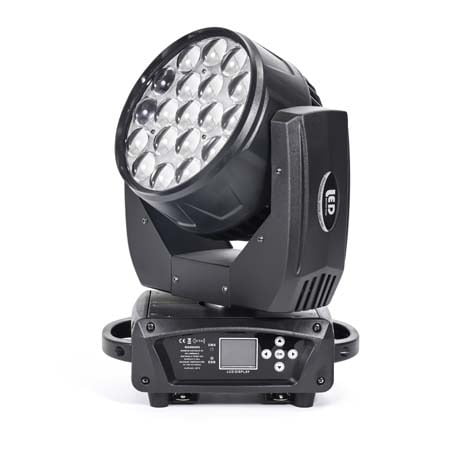
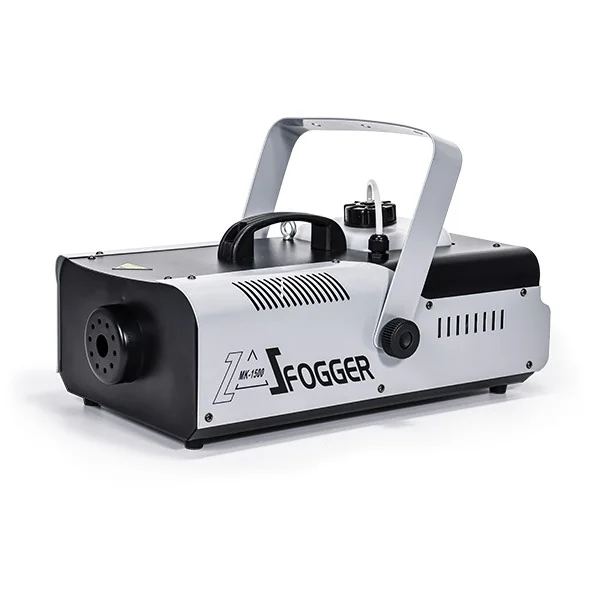
Most lighting rigs—whether small mobile setups or large multi-universe installations—use a DMX controller to coordinate PAR lights, moving heads, fog machines, lasers, LED bars, and atmospheric effects. By assigning each fixture a unique address and channel range, the controller can control multiple devices independently or in synchronized groups.
A complete DMX system typically includes:
A controller (hardware console or software + DMX interface)
DMX cabling used to link fixtures in a daisy-chain
One or more DMX universes depending on the channel requirements
Fixtures that respond to the DMX signals
In practical terms, the DMX controller functions as the “brain” of your dmx lighting system—handling scene creation, effects programming, transitions, and live playback. From simple 16-channel setups to advanced multi-universe networks, the controller determines how efficiently and creatively you can shape your lighting design.
3. DMX Controller Types by Channel Capacity
Choosing a DMX controller often starts with understanding how many dmx channels your lighting system requires. Different controllers support different capacities, from small beginner setups to multi-universe professional rigs. Here are the main types categorized by channel capacity:
DMX192 Controllers
Ideal for small rigs with basic PAR lights, LED bars, or a few entry-level moving heads. Perfect for weddings, DJs, and compact stage lighting control setups.DMX384 Controllers
A mid-range option for users needing more flexibility. Suitable for medium venues with mixed light fixtures and slightly more complex programming requirements.DMX512 Controllers
The industry standard. Supports one full DMX universe with 512 channels—enough for moderate rigs containing multiple 16-channel moving heads, fog machines, RGBW LED fixtures, and more.DMX1024 / Multi-Universe Controllers
Designed for large setups where a single universe isn’t enough. Ideal for professional productions, theaters, clubs, and touring environments requiring advanced light control over hundreds of fixtures.
These categories help ensure your controller can handle your current rig and leave room for future expansion.
4. How Many Channels Do You Actually Need?
One of the biggest mistakes beginners make is choosing a DMX controller without calculating their total channel requirements. Every light fixture consumes a certain number of dmx channels, and once your rig grows, those channels add up quickly. Underestimating this leads to running out of control capacity long before the show even starts.
To calculate the number of channels you need, use this simple formula:
Total DMX Channels = (Channels per Fixture) × (Number of Fixtures)
Here are practical examples that mirror real-world stage setups:
6-channel LED PAR × 20 fixtures = 120 channels
Even a basic PAR-heavy setup can consume a surprising amount of your DMX universe.16-channel moving head × 10 fixtures = 160 channels
Moving heads are channel-intensive because they include pan/tilt, color, gobo, strobe, dimming, prism, and more.Combined total = 120 + 160 = 280 channels
A system like this already consumes over half a single DMX512 universe.
Add in fog machines, lasers, pixel bars, or additional effect fixtures, and it becomes clear why many productions quickly outgrow entry-level controllers like DMX192.
In short:
If your lighting setup involves multiple moving heads, advanced RGBW fixtures, or plans for expansion, you’ll need at least a DMX512 controller, and possibly a 1024-channel or multi-universe model to future-proof your rig.
5. Recommended DMX Controllers by Scenario
Different lighting setups require different levels of dmx control, channel capacity, and programming flexibility. Here’s a practical guide to choosing the right DMX controller based on your real-world stage environment and fixture count.
Small Events, Weddings & Home Parties

Recommended: DMX192 / DMX384 Controllers
Ideal for small rigs with limited PAR lights or simple RGB fixtures
Suitable when your total channel count is low
Great for shorter cable runs and basic stage lighting control
Easy for beginners to program and operate
Bars, DJs, Small Stages & Multi-Purpose Venues

Recommended: DMX512 Controllers
Handles mixed rigs: PARs, LED bars, a few moving heads
Enough channels to comfortably control multiple light fixtures
More advanced effects and scene programming
Good balance between power and affordability
Medium Theaters, Clubs & Professional Events

Recommended: DMX1024 / Dual-Universe Controllers
Essential when working with many 16-channel moving heads
Supports more dynamic shows with fog machines, strobes, lasers
Allows expansion without running out of DMX channels
Great for semi-professional to professional applications
Large Concerts, Touring Productions & Broadcast Shows

Recommended: Advanced Multi-Universe Consoles
(e.g., Tiger, Black Horse, M2, M3, GrandMA-class controllers)
Multiple DMX universes for large, complex rigs
Designed to control multiple fixture types across huge stages
Needed for pixel mapping, advanced effects, timecode shows
Maximum reliability for long productions and large cable runs
Selecting based on scenario ensures your controller can handle your current lighting setup—and scale with your future needs.
6. Pros & Cons of Common DMX Controllers
Below is a clear comparison of the most common DMX controller categories, helping you quickly understand their strengths and limitations before choosing the right tool for your dmx lighting setup.
DMX Controllers Comparison Table
| Controller Type | Pros | Cons |
|---|---|---|
| DMX192 | Affordable and beginner-friendly; perfect for simple PAR lights and small rigs; compact for short cable runs | Limited channel count; not suitable for multiple moving heads or large setups |
| DMX384 | More flexibility than 192; handles mixed fixtures; budget solution for growing rigs | Still limited for advanced stage lighting control; not ideal for multi-universe expansion |
| DMX512 (1 Universe) | Industry standard; enough channels for moderate rigs; supports moving heads, fog machines, LED bars | Can run out of channels fast with 16-channel fixtures; limited scaling |
| DMX1024 (2 Universes) | Great for theaters and medium events; supports larger rigs and complex programming | Higher cost and slightly more complex to learn |
| Multi-Universe Consoles (Tiger, Black Horse, M2, M3, MA-Class) | Professional-grade control; handles massive rigs; supports advanced effects, pixel mapping, and long cable runs | Expensive; steep learning curve; unnecessary for small productions |
7. Recommended Mainstream DMX Consoles
Choosing a DMX controller becomes much easier once you understand how different models perform in real production environments. Below are widely used consoles across small venues, professional theaters, touring shows, and large-scale stage lighting control systems—each with its own strengths and ideal use cases.
DMX512 Console

A practical and affordable choice for beginners or small venues. It provides one full DMX universe with enough channels to run PAR lights, simple LED fixtures, and a few moving heads. Easy to learn, stable in performance, and ideal for DJs, weddings, schools, or small stages needing reliable light control.
Pearl Console

Known as one of the most widely used consoles in China and globally, the Pearl series offers a strong balance of power and simplicity. With rich fixture libraries, stable operation, and an intuitive programming workflow, it’s perfect for mid-size events, theaters, and touring shows where operators need fast, dependable scene creation.
Tiger Console

A modern console with a fast and highly visual touch-screen workflow. It supports advanced features like Art-Net, sACN, pixel effects, CITP, Wi-Fi control, and built-in 3D visualization. Excellent for designers who need speed and creativity—especially for clubs, events, and touring where efficiency matters.
Black Horse Console

Equipped with powerful CPU hardware, dual motorized screens, extensive DMX outputs, and strong 3D rendering capability, Black Horse delivers high-level performance for complex productions. Ideal for professionals managing large multi-universe rigs with moving heads, pixel bars, fog machines, and synchronized multimedia effects.
M2 Console

A robust multi-universe console featuring motorized faders, advanced networking, precision encoders, and built-in UPS power protection. Suitable for large venues and touring productions needing reliable multi-universe control, fast programming, and sophisticated playback capabilities.
M3 Console

The top-tier option in this lineup—offering multiple motorized screens, extensive fader banks, fast hardware processing, advanced networking, and full multi-universe scalability. Designed for the biggest stages, concerts, TV productions, and festivals where complex rigs and high-level lighting design demand maximum control.
8. Key Features That Actually Matter
When choosing a DMX controller, marketing terms can be misleading. What truly matters are the features that improve workflow, stability, and real-world performance. The following are the most important factors to consider for any stage lighting control setup:
Total DMX Channels & Universes
Determines how many fixtures you can control now and in the future. Multi-universe support is essential for larger rigs.Fixture Library Support
A controller with a wide and editable library makes programming faster, especially for complex moving heads and pixel fixtures.Programming Workflow & Ease of Use
Look for intuitive controls, clear menus, and efficient scene/chase creation—critical for both beginners and professionals.Networking Protocols (Art-Net / sACN)
Necessary for modern rigs using long cable runs, media servers, or large numbers of fixtures.Playback Faders & Execution Buttons
The more physical controls available, the easier it is to handle live shows and multiple cues simultaneously.Effect & Shape Generator
Saves hours of manual programming when creating movement effects, color chases, pixel animations, and dynamic scenes.Expandability & Future-Proofing
Support for external wings, additional universes, or integration with software helps the controller grow with your needs.Display & Visualization Tools
Touchscreens, 3D visualizers, and layout views make programming faster and more accurate.Power Stability & Safety Features
UPS support, stable PSU, and robust hardware design ensure reliability during live events.Connectivity Options
Useful ports include DMX in/out, MIDI, audio input, USB for backups, and network connections for extended control.
This list reflects the real factors that affect performance—not marketing claims—helping you choose a controller that will serve you well across a wide range of lighting scenarios.
9. Common Mistakes When Choosing a DMX Controller
Many users—especially beginners—end up buying the wrong DMX controller because they overlook key technical details or misunderstand how DMX lighting systems actually work. Avoiding these common mistakes will save money, reduce frustration, and ensure your stage lighting control setup performs smoothly.
Misjudging Total DMX Channels Needed
The most common error. Users forget to calculate fixture channels (especially 16-channel moving heads), quickly exceeding controller limits.Buying Based on Price Instead of Requirements
Cheaper controllers (e.g., DMX192) are fine for small rigs but become useless once more fixtures or effects like fog machines are added.Assuming All Controllers Work the Same
Different controllers vary greatly in workflow, features, universe support, and reliability during live shows.Ignoring Future Expansion
Even if your current rig is small, choosing a controller without headroom (such as multi-universe support) can limit future upgrades.Not Understanding DMX Universe Limitations
One universe = 512 channels. Large setups require multiple universes; many beginners don’t realize this until it’s too late.Overlooking Networking Capabilities (Art-Net/sACN)
Modern rigs often use networked lighting; controllers without these protocols can’t handle advanced layouts or long cable runs.Choosing Models With Poor Fixture Library Support
If the controller lacks proper fixture profiles, programming will be slow, frustrating, and error-prone.Ignoring Build Quality & Power Stability
Live shows require reliable hardware—weak power supplies or unstable consoles can cause blackout failures.
Avoiding these mistakes ensures you choose a DMX controller that not only fits your needs today but continues to perform reliably as your lighting system grows.
10. Buying Advice: How to Pick the Right Model
Choosing the correct DMX controller depends on your fixture count, channel requirements, and the complexity of your lighting environment. The table below provides a practical, scenario-based recommendation to help you make the right decision.
DMX Controller Buying Guide
| Your Lighting Setup | Typical Equipment | Required Capacity | Recommended Controller Type |
|---|---|---|---|
| Small Events / Weddings / Home Parties | A few LED PARs, simple RGB fixtures | Low channel usage | DMX192 — budget-friendly and sufficient for basic rigs |
| Mobile DJs / Small Bars | PARs + a few 16-channel moving heads | Medium channel usage | DMX384 or DMX512 — more flexibility, supports mixed fixtures |
| Medium Stages / Clubs / Theaters | Multiple moving heads, LED bars, fog machines | High channel usage | DMX512 or DMX1024 — handles more complex shows and more fixtures |
| Large Venues / Touring Shows | High fixture count, pixel bars, advanced effects | Very high (multi-universe) | Multi-Universe Consoles (Tiger, Pearl, Black Horse) — strong programming tools & scalability |
| Professional Concerts / Broadcast / Festivals | Hundreds of fixtures, pixel mapping, multimedia integration | Extreme channel + universe demands | M2 / M3 / MA-class Consoles — top-tier stability, large cue stacks, advanced networking |
This table helps you quickly identify the best controller based on real-world needs, ensuring your choice aligns with your stage size, fixture complexity, and long-term lighting goals.
11. FAQ
1. What is the difference between DMX192 and DMX512 controllers?
DMX192 supports 192 channels and is suitable for small rigs, while DMX512 provides a full 512-channel DMX universe—ideal for setups with multiple moving heads, fog machines, and more complex stage lighting.
2. How many DMX channels do I need for my lighting setup?
Your required channels depend on the formula: Fixture Channels × Number of Fixtures. Moving heads (often 12–16 channels each) will quickly increase total DMX usage, requiring DMX512 or higher.
3. Can a DMX controller run multiple lighting fixtures at the same time?
Yes. As long as you have enough DMX channels and properly assigned addresses, a DMX controller can control multiple fixtures independently or as synchronized groups.
4. Do I need a multi-universe console for stage lighting control?
You need multi-universe control if your total channels exceed 512, or if your venue uses many moving heads, pixel bars, or advanced effects. Large clubs, theaters, and touring shows typically require 2–8 universes or more.
5. Can DMX controllers operate fog machines and other effects?
Yes. Most DMX fog machines, hazers, strobes, and laser units occupy 1–6 channels and can be fully controlled through any standard DMX controller that supports their channel modes.
12. Conclusion
Choosing the right DMX controller is not just a technical decision—it directly impacts the professionalism, stability, and creativity of your entire lighting setup. Whether you’re running a small event or managing large-scale stage productions, selecting a controller with the correct channel capacity, essential features, and room for future expansion ensures smoother programming, cleaner show execution, and fewer technical limitations.
For B2B buyers—such as event companies, rental houses, stage integrators, and venues—the right DMX controller is an investment that increases operational efficiency, reduces labor time, and delivers consistent high-quality lighting results for every project. If you are upgrading your rig or building a new lighting system, choosing a reliable controller from a professional manufacturer will help your team work faster, reduce risks, and elevate your client experience.
Ready to build a more powerful and scalable lighting control system?
Now is the best time to choose a DMX controller that grows with your business and supports every stage you design.



 EN
EN  ES
ES  PT
PT  DE
DE  FR
FR  KO
KO  JA
JA  RU
RU  AR
AR  IT
IT  TR
TR  MS
MS  ID
ID  VI
VI  TH
TH  HI
HI  BN
BN  ZH
ZH